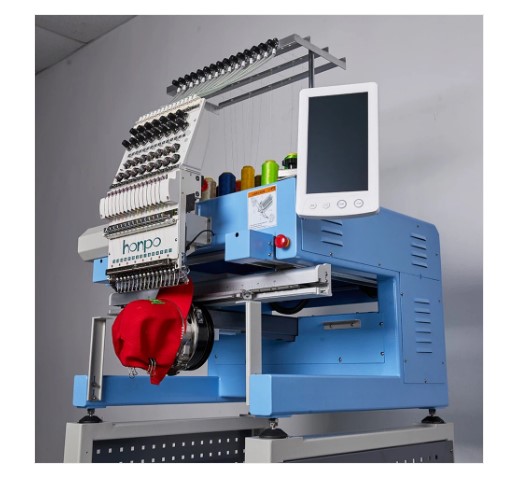
Hat embroidery is a great way to show a brand, team name, or custom style. Caps are worn every day, so a clean stitched design can get a lot of attention. But hats are not flat like shirts. They have curves, seams, and firm front panels. That means the artwork must be ready before stitching begins.Many new users start with art that looks good on screen but fails on a cap. That is why Hat Embroidery Digitizing Tips are so useful.
Good prep helps the design stitch clean, stay sharp, and fit the hat shape. Small changes in art can make a big change in the final result.
A hat has less room than many people think. The front area is small. The center seam can also affect the stitch path. If the art is too busy or too thin, the design may look rough.
This guide will show you how to prepare artwork the right way. You will learn size rules, line fixes, text choices, color plans, and real shop tips. These steps help you get pro results.
Why Hat Artwork Needs Special Care
Hats are one of the hardest items to embroider well. The shape is curved, and the front may be thick or stiff.
Common Hat Challenges
Curved Surface
The machine must stitch over a round shape.
Center Seam
Many caps have a seam in the middle front.
Limited Space
The front panel has only so much room.
Thick Material
Some hats use firm buckram or layered cloth.
Because of this, art for hats must be cleaner and bolder than art for flat items.
Start with the Right Design Idea
Before opening any art app, know the goal of the hat design.
Ask These Questions
- Is this for a brand logo?
- Is it for sports wear?
- Will it be worn daily?
- Does it need text?
- Is the hat flat bill or curved bill?
The answers help shape the design.
Keep It Simple
A cap logo should be easy to read fast. Most people see hats from a short distance. Clear shapes work best.
Know the Safe Stitch Area
Many cap fronts have a common stitch zone. This can vary by hat style and machine, but there are safe ranges.
Common Front Size Range
- Width: about 4 to 5 inches
- Height: about 2 to 2.5 inches
Always check with your machine or shop.
Why Size Matters
If art is too tall, it may hit the top curve. If too wide, it may wrap too far on the sides.
Use Bold Shapes and Clean Lines
Thin lines often sink into fabric or break apart.
Better Choices
Thick Lines
These show up better in thread.
Bold Shapes
Solid forms look strong on caps.
Open Spaces
Give room between parts.
Simple Curves
Smooth curves stitch better than rough ones.
Avoid
- Hairline strokes
- Tiny dots
- Fine detail
- Crowded shapes
Thread needs room to sit well.
Prepare Text the Smart Way
Text is common on hats. But text can fail if it is too small.
Best Text Tips
Use Bold Fonts
Block fonts are easier to read.
Keep Letters Large
Small text may fill in with thread.
Add Space
Tight letters can blend together.
Limit Words
Short names or one line often look best.
Great Text Uses
- Brand name
- Team name
- Initials
- Short slogan
Think About the Center Seam
Many structured caps have a seam down the middle front.
Why This Matters
The seam lifts the fabric. It can split thin text or small detail.
Smart Design Fixes
Place Main Gap in Center
Use open space at the seam line.
Use Symmetry
Designs that split evenly can look balanced.
Avoid Tiny Detail on Seam
Keep small text off the center.
This is a common pro trick in hat work.
Choose the Right Colors
Thread color on a hat should be easy to see.
Best Color Tips
- Use contrast with the hat color
- Limit colors when possible
- Use light thread on dark hats
- Use dark thread on light hats
Example
White thread on black cap looks bold. Gray on black may look dull.
Metallic Thread?
Use only if tested well. It can be harder to run.
Clean Up the Artwork File
Before digitizing, the art file must be neat.
Check These Items
Remove Extra Points
Messy vector paths can slow edits.
Fix Rough Curves
Smooth lines help stitch flow.
Close Shapes
Open paths can cause issues.
Align Elements
Make sure text and icons are straight.
Use zoom tools to inspect every part.
Best File Types to Send
Your digitizer or software may ask for source files.
Good Choices
SVG
Great for vector logos.
AI or EPS
Used in design work.
Good for proof sharing.
PNG
Fine if high quality and clear.
Low quality images make the job harder.
Plan Stitch Depth in the Art Stage
Not all parts need the same focus.
Put Focus on One Main Part
This can be:
- Logo icon
- Brand name
- Initial letter
Too many strong parts fight for space.
Keep Balance
If text is large, icon may need to be small. If icon is bold, text may need less weight.
Match the Design to Hat Style
Not every cap is the same.
Structured Caps
Firm front panel. Great for bold logos.
Soft Caps
Less firm. Better for light stitch counts.
Trucker Hats
Front foam panel often works well with clean bold art.
Dad Hats
Low profile and curved. Small clean logos work best.
Know the hat before final art prep.
Real Shop Tips from Experience
After many hat jobs, one rule stands out: less detail gives better results.
Many clients send logos made for print. Print can use tiny lines and shadows. Thread cannot always do that on a cap.
What Works Best
- One strong icon
- One clean font
- Two or three colors
- Clear spacing
Simple art often looks more premium on hats.
Always Run a Sample Stitch
Even perfect art needs testing.
Why Testing Helps
Thread, needle, cap frame, and fabric all affect results.
What to Check
Is Text Clear?
Look at small letters.
Are Lines Smooth?
Watch curves and corners.
Is Center Seam Clean?
See if the seam hurts the look.
Is Shape Straight?
Check placement on the cap.
One sample can stop many errors.
Common Mistakes to Avoid
Too Much Detail
Small parts get lost.
Tiny Text
Hard to read after stitching.
No Contrast
Logo blends into the cap color.
Ignoring the Seam
Center line can split art.
Using Low Quality Image
Blurry files slow the process.
Build Trust with Better Design Prep
If you make hats for clients, trust is key.
Good Habits
Show Mockups
Let clients see size and look.
Explain Limits
Tell them if text is too small.
Offer Test Sample
Shows care and skill.
Keep Files Saved
Easy for repeat orders.
These steps help build long term buyers.
Helpful Workflow for New Users
Use this simple plan each time:
- Ask where the logo goes
- Check cap style
- Size the art right
- Simplify detail
- Choose strong colors
- Clean the file
- Digitize with care
- Run sample stitch
- Adjust if needed
- Start full run
This method saves time and waste.
Why Good Prep Saves Money
Bad prep can lead to thread breaks, wasted hats, slow runs, and unhappy buyers.
Good prep gives:
- Faster machine time
- Cleaner results
- Less rework
- Better reviews
- Repeat orders
That is why pro shops spend time on art first.
Final Thoughts
Preparing artwork for professional hat stitching is all about smart planning. Hats have curves, seams, and small front space. So the design must be clean, bold, and easy to read.
Use strong shapes, clear text, and high contrast colors. Keep detail low and spacing open. Think about the center seam and match the design to the hat style.
Then clean the file, digitize well, and always run a test sample. These steps come from real production work and help deliver better hats every time.
When the artwork is right, the stitching becomes easier. And when the stitching is clean, the hat looks pro, sharp, and ready to wear.